Greenhouse Integration

Seamlessly integrate SkillMatchIQ's AI-powered candidate assessment directly into your Greenhouse Recruiting workflow.

Quick Overview

Get AI-powered candidate insights directly in Greenhouse with real-time scoring, skill analysis, and hiring recommendations.

ℹ️
Integration Partner Status: SkillMatchIQ is an official Greenhouse integration partner. This integration uses both the Assessment API and the Harvest API (v3 with OAuth 2.0) for a secure and complete workflow.
🎯

On-Demand Assessment

Trigger AI analysis with a single click from the candidate's Interview Plan in Greenhouse.

πŸ“Š

Detailed Analytics

Comprehensive skill matching, gap analysis, and candidate recommendations posted to the Activity Feed and Application-level custom fields.

πŸš€

Job Leaderboards

Rank candidates for a specific job with aggregated insights posted to the job's "Notes" tab.

⚑

Seamless Workflow

A native Greenhouse experience with custom fields, tags, and notes automatically populated.

Setup Integration

Follow these steps to connect SkillMatchIQ with your Greenhouse account. This is a two-part process.

ℹ️
Prerequisites:
  • You must have an active SkillMatchIQ account.
  • You must have Site Admin permissions in Greenhouse Recruiting with the user-specific permission Can manage ALL organization’s API Credentials.
1
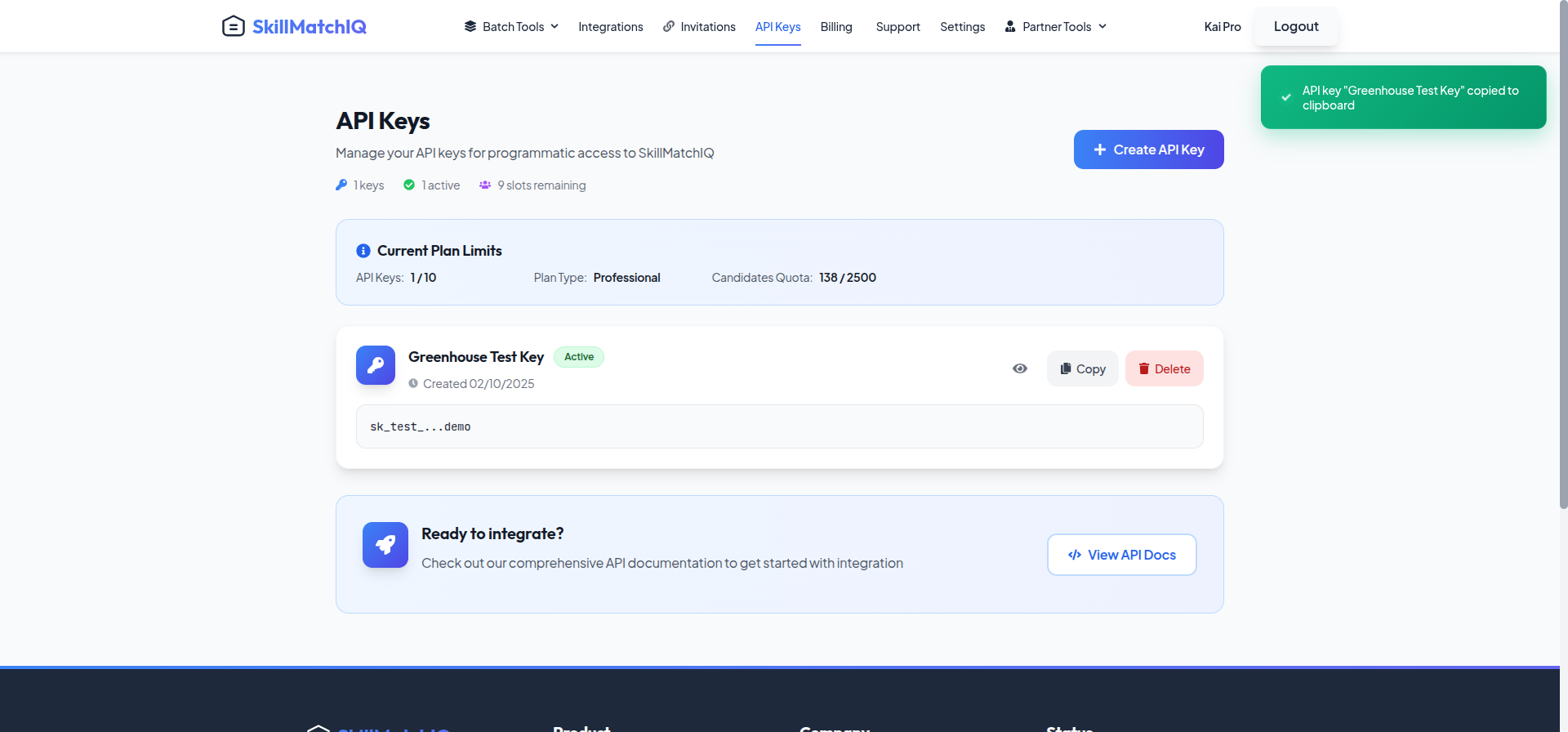
SkillMatchIQ API Keys page showing key creation

Generate API Key

Log into your SkillMatchIQ account, navigate to the API Keys page, and click "Create API Key." Name it "Greenhouse Assessment Key" and copy the key to a secure location.

SkillMatchIQ β†’ API Keys β†’ Create API Key
2
Greenhouse support Get Help widget

Provide Key to Greenhouse

Contact Greenhouse Support to enable the integration. In your ticket, request a secure link to provide your API key. They will send you a SendSafely link to paste your key into.
πŸ”
Never send your API key directly in an email. Always use the secure link provided by Greenhouse Support.
3
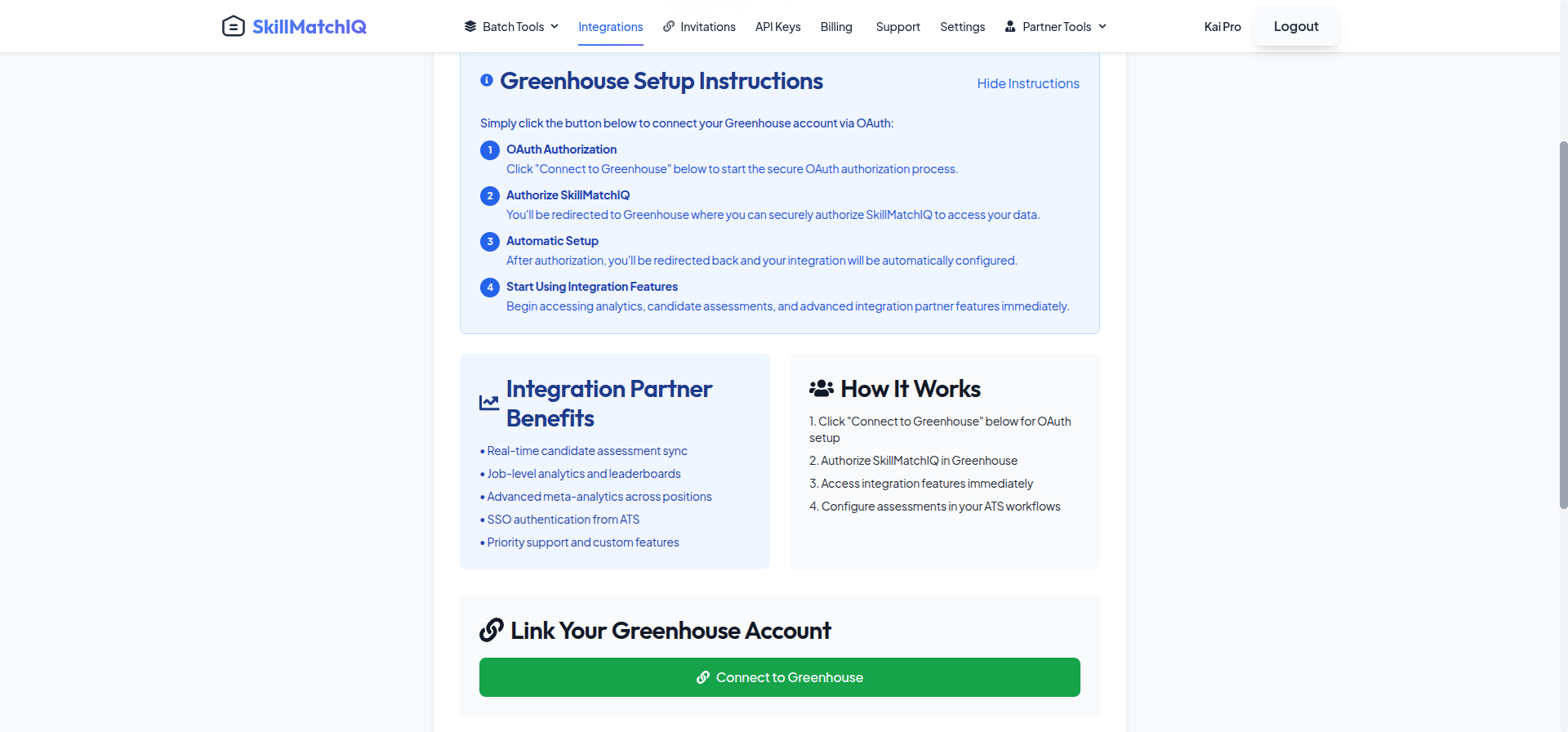
SkillMatchIQ Integrations page showing the Greenhouse connect button

Initiate Connection

In your SkillMatchIQ account, go to the Integrations page. Find the Greenhouse card and click the "Connect" button.
SkillMatchIQ β†’ Integrations β†’ Connect Greenhouse
4
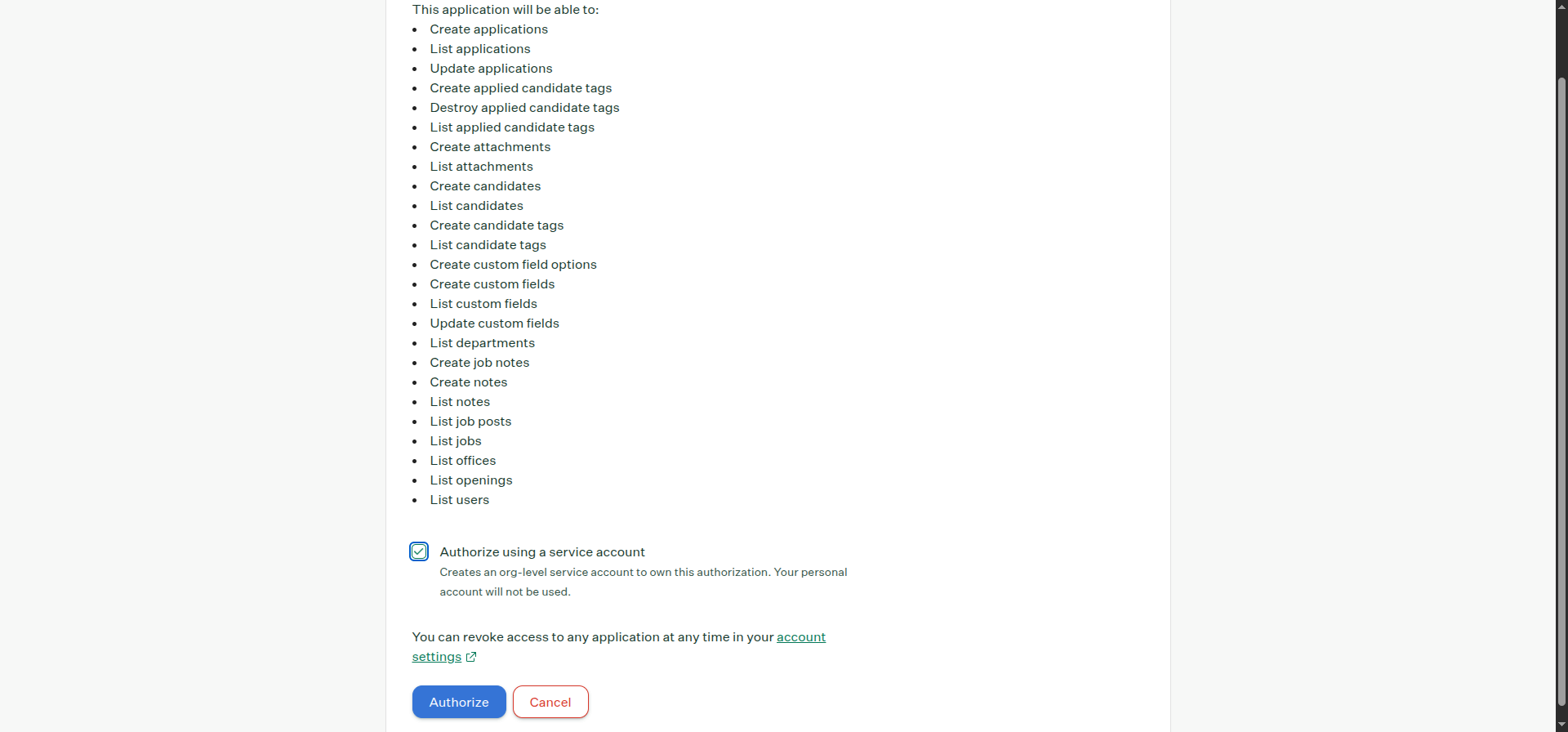
Greenhouse OAuth authorization screen showing permissions

Authorize in Greenhouse

You will be redirected to Greenhouse. Log in if prompted, review the requested permissions, and click Authorize to grant SkillMatchIQ access to post results back to your account.
5
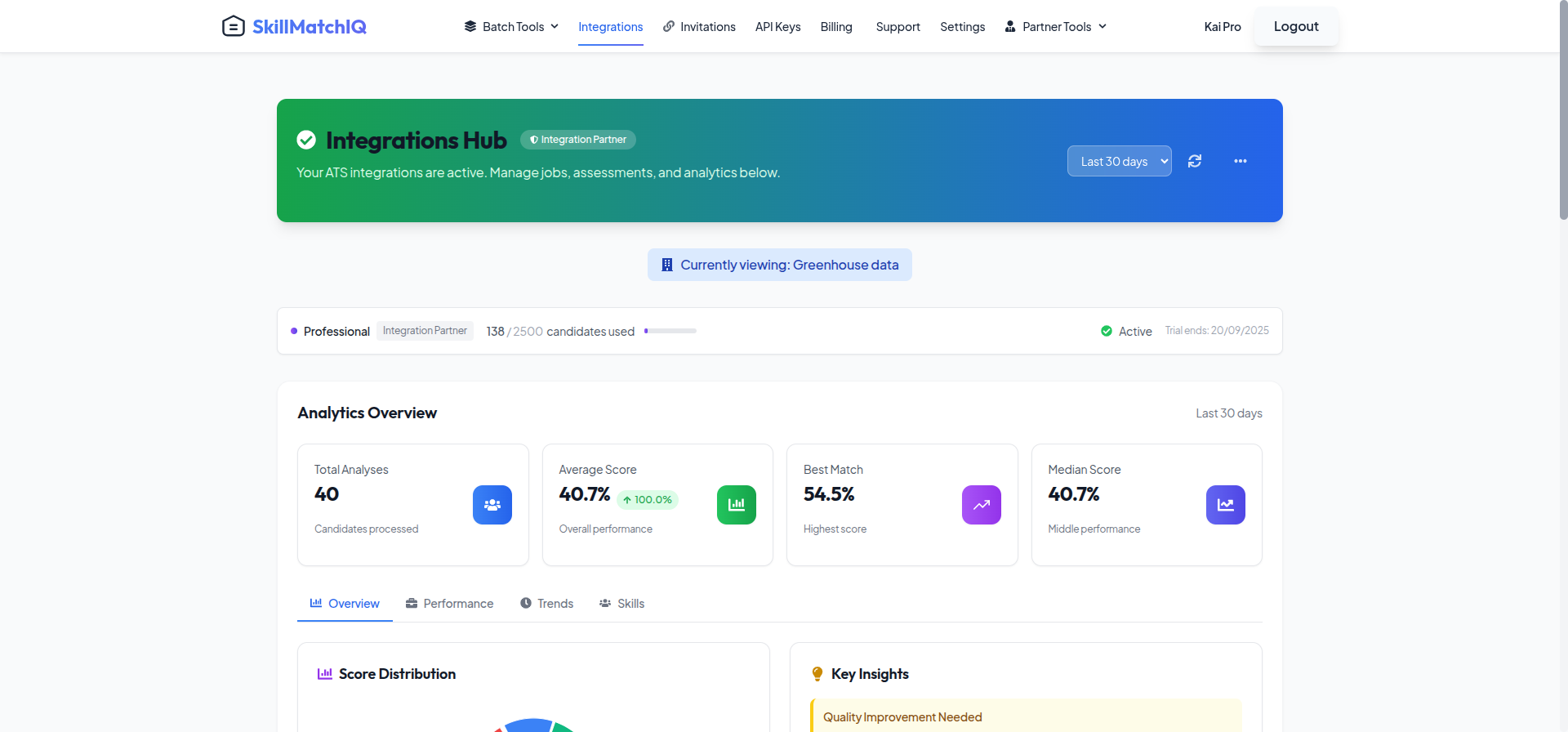
Connected status for Greenhouse in SkillMatchIQ

Confirmation

After authorization, you will be redirected back to a SkillMatchIQ page. This will securely log you back into your account (Single Sign-On) and then automatically take you to your Integrations page. The Greenhouse card will now show a "Connected" status. Your setup is complete!

βœ…
Integration Complete! You can now add the SkillMatchIQ Assessment stage to any job's Interview Plan in Greenhouse to begin analyzing candidates.

SkillMatchIQ Features in Greenhouse

What you'll see once the integration is active

πŸ“Š

Assessment Scores

Real-time candidate scores appear directly in Greenhouse with breakdowns for Overall Match, Core Skills, and Skill Gaps.

🎯

Custom Fields

SkillMatchIQ populates custom fields on the **Application** for score/fit and on the **Candidate** for assessment date, enabling easy filtering.

🏷️

Smart Candidate Tags

Automatic tagging based on assessment results, such as "High Potential Candidate" or "Skills Gap Identified".

πŸ“

Detailed Activity Feed Notes

A comprehensive assessment summary with hiring recommendations is added to the candidate's Activity Feed.

πŸ“ˆ

Job Leaderboard Notes

A ranked list of all candidates for a role is posted to the Job's "Notes" tab, providing a powerful comparative view.

πŸ”—

Direct Report Links

Each summary note includes a secure link to the full, interactive assessment report within SkillMatchIQ.

Assessment Types

Choose the right assessment approach for your hiring needs

πŸ‘€

Individual Candidate Report

Complete analysis of one candidate with all matched skills, gaps, and surplus skills listed in full detail.

πŸ’‘
Best for: Initial screening and detailed candidate evaluation.
πŸ“Š

Job Candidate Leaderboard

Individual analysis PLUS complete job-level aggregates: full candidate rankings and common matches across all candidates.

πŸš€
Best for: High-volume hiring and competitive roles.

Understanding SkillMatchIQ Scores

How our AI evaluates and scores candidates

🎯

Overall Match Score

A comprehensive compatibility rating from 0-100%, with clear recommendations for each tier (e.g., 90-100% is an "Exceptional Match").

🧠

Core Skills Analysis

Focused evaluation of essential job requirements, including technical skills, experience level, and industry knowledge.

⭐

Skill Categories

Multi-dimensional evaluation across Technical Skills, Soft Skills, Experience, Education, and Domain Knowledge.

πŸ”

AI Analysis Features

Advanced capabilities like semantic skill matching, growth potential assessment, and market competitiveness benchmarking.

Workflow Integration

How SkillMatchIQ fits into your existing Greenhouse process

1

Move Candidate to Stage

A recruiter moves a candidate into the 'SkillMatchIQ Assessment' stage in the job's Interview Plan.

Interview Plan β†’ Move Stage
2

Trigger Assessment

The recruiter clicks the "Send Test" link. This triggers an internal AI analysis, not an email to the candidate.

Click "Send Test" β†’ Analysis Starts
3

Receive Real-time Results

Results appear in Greenhouse within minutes as a detailed note, custom fields, and tags.

Average time: 1-3 minutes
4

Enhance Decision Making

Use AI insights for interview prep, candidate ranking, and hiring decisions.

Scores β†’ Notes β†’ Leaderboard